1 Overview
1.1 Bill of Materials (BOM)
| Manufacturer Part Number | Manufacturer | Description | Quantity | Notes |
|---|---|---|---|---|
| STM32L432KC | STMicroelectronics | 32-bit MCU | 1 | |
| CP2102N-A02-GQFN24R | Silicon Labs | USB 2.0 to UART Interface | 1 | |
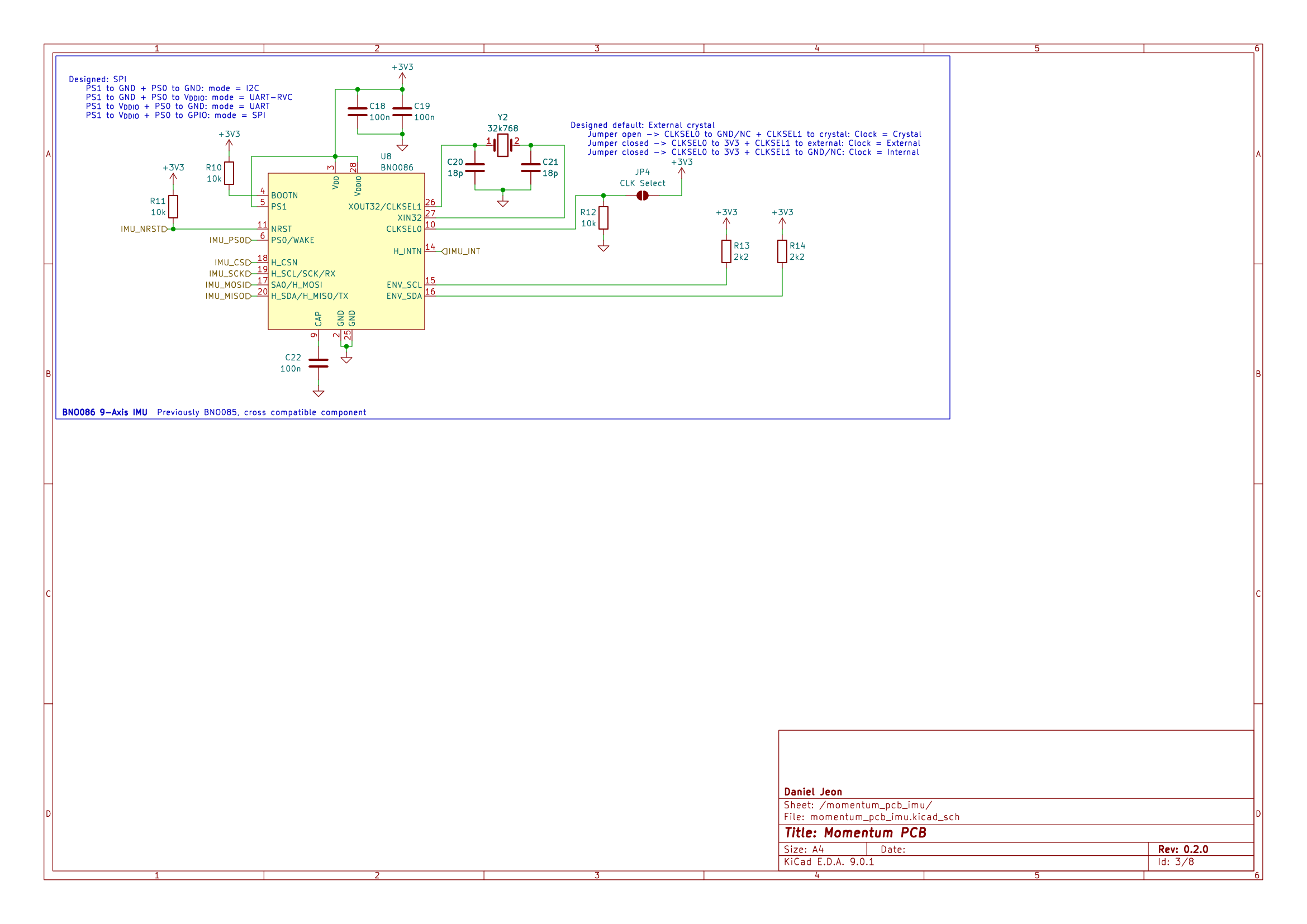
| BNO086 | CEVA Technologies, Inc. | 9-DOF IMU | 1 | |
| BMP390 | Bosch Sensortec | Barometric Pressure Sensor | 1 | |
| TJA1057BTK | NXP USA Inc. | CAN Bus Transceiver | 1 | |
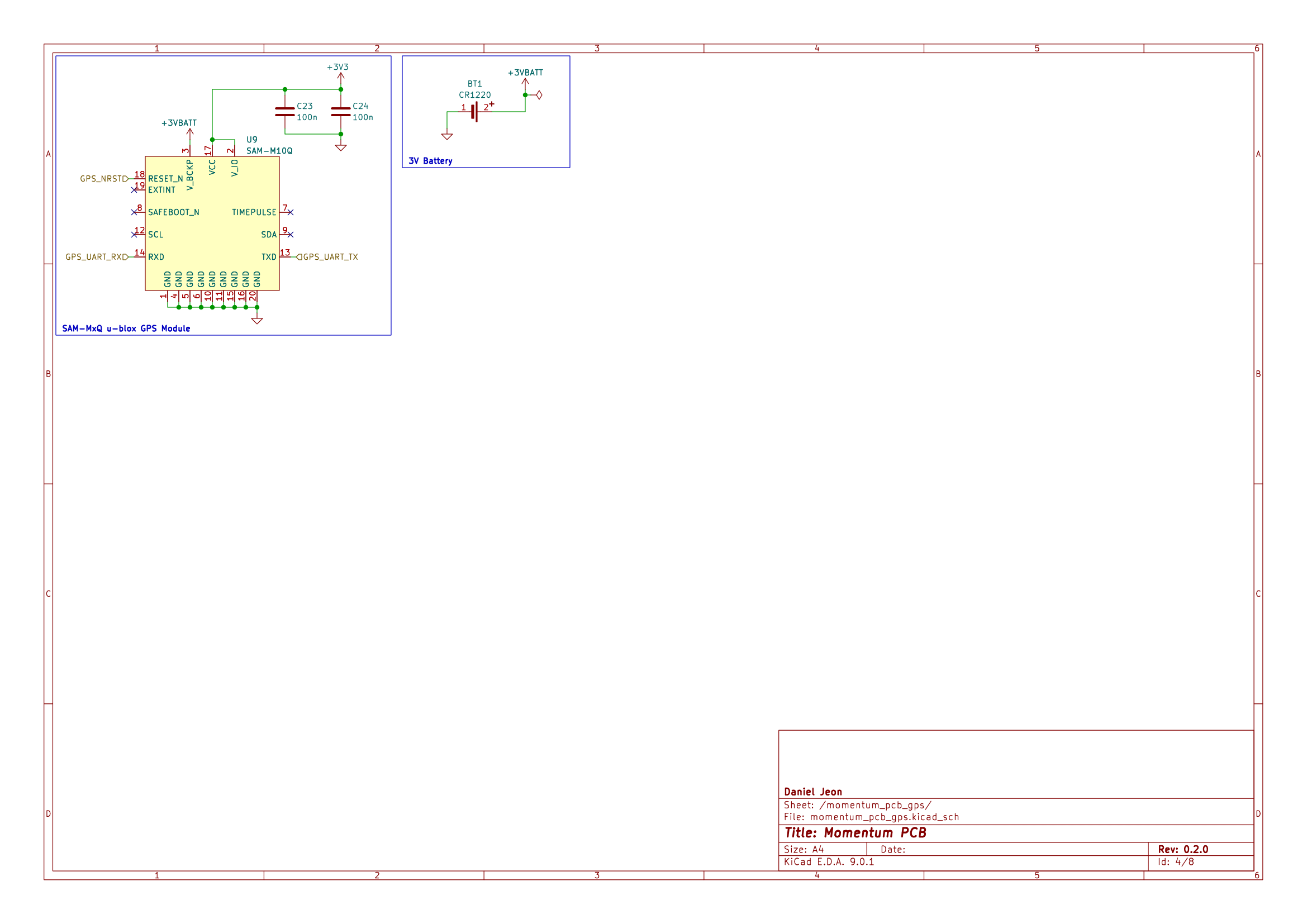
| SAM-M10Q | u-blox | RF Receiver Galileo, GLONASS, GPS | 1 | |
| WS2812B | (Various) | PWM Addressable RGB LED | 1 |
2 Board Specifications
2.1 Connectors
Connectors fixed by hardware (PCB traces or the connector itself).
| Connector | Ref | Description |
|---|---|---|
Tag-Connect TC2050 | J1 | SWD programming/debug connector |
BOOT0 jumper | J2 | Open for run flash memory (pull-down on open) |
USB-C | J3 | USB-to-serial programming/debug, secondary 5 V source |
CAN1 | J4 | Pin 1: CAN1 High, Pin 2: CAN1 Low |
2.2 Switches & Jumpers
User controllable hardware and/or firmware driven inputs.
| Switch/Jumper | Ref | Description |
|---|---|---|
Sensor Hub MCU reset button | SW1 | Generic 6 mm TH button, push to reset |
5 V bypass | JP1 | Closed = Short protection (schottky) diode pads, open = enforce schottky diode |
Level shifter V IO | JP2 | 1 + 2 closed = 5 V, 2 + 3 closed = 3.3 V |
BOOT0 DTR bridge | JP3 | Closed = CP2102N DTR BOOT0 control, open = Manual BOOT0 |
BNO086 clock select | JP4 | Open = crystal, closed = external/internal |
BMP390 I2C address | JP5 | Open = 0x76, closed = 0x77 |
Interface SPI CS pin select | JP6 | 1 + 2 closed = CS1 (D10), 2 + 3 closed = CS2 (D8) |
Interface 3.3 V output | JP7 | Open = no output, closed = 3.3 V LDO output bridged |
Interface NRESET output | JP8 | Open = no output, closed = STM32 NRST bridged |
2.3 Batteries
Onboard battery supplies.
| Battery | Ref | Description |
|---|---|---|
CR1220 battery cell | BT1 | u-blox GPS RTC and ephemeris RAM (reverse polarity protected) |
2.4 LEDs
LEDs used to show board status and/or user controllable.
| Test Point | Mark | Description |
|---|---|---|
UART TX | Silkscreen: “TX” | Green LED: blinking = transmitting data |
UART RX | Silkscreen: “RX” | Amber LED: blinking = receiving data |
5 V Supply | Silkscreen: Lighting bolt | Amber LED: on = 5V pin, off = (only) USB-C |
WS2812B LED | None | RGB addressable LED |
2.5 Test Pads
| Test Point | Ref | Description |
|---|---|---|
GPS NRST | TP1 | u-blox GPS NRST net |
GPS RX | TP2 | u-blox GPS RX net |
GPS TX | TP3 | u-blox GPS TX net |
WS2812B LED PWM | TP4 | DOUT from onboard WS2812B |
2.6 Power Supply
The board can be powered by either of the following methods:
- 5V pin via the Uno-style interface.
- Onboard USB-C connector.
2.6.1 5 V Power OR Switch
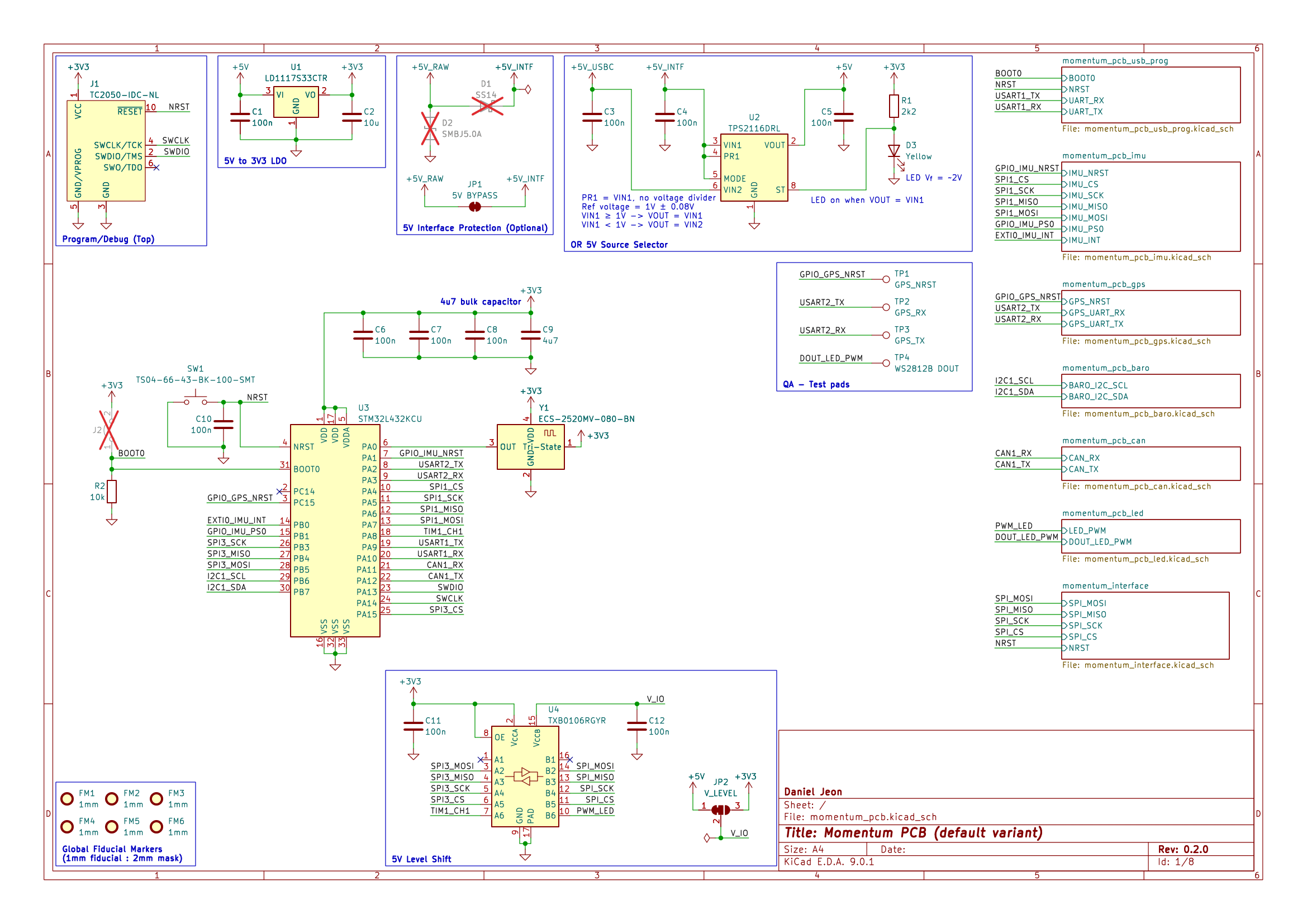
The 5 V supply is managed by an OR power switch (TPS2116DRL).
The 5V pin from the Uno-style interface takes priority. As long as ~1 V or more is present on this pin, it will be used as the power source. If this condition is not met, the board automatically switches to the USB-C 5 V supply.
2.6.2 Optional 5 V Pin Supply Protection
The 5V pin supply can be configured with optional protection diodes (default not included), see the following instructions:
- The
5 V bypassjumper must be cut to stop shorting of the schottky diode pads, enforcing the schottky diode. - Schottky diode required (designator
D1, footprint SMA).- Intended to provide reverse polarity protection.
- TVS diode required (designator
D2, footprint SMB).- Intended to provide short high voltage clamping.
2.6.3 3.3 V LDO Supply
The 3.3 V supply is managed onboard by a dedicated 5 V to 3.3 V LDO, independent of any connected board.
If the user wishes to use the Momentum dev board’s 3.3 V supply for low current applications, the Interface 3.3 V output jumper can be bridged, allowing for 3.3 V to be supplied from the onboard LDO. This should only be done with caution, as a connected main controller which would supply its own 3.3 V on the same Uno-style interface 3.3V output pin.
2.7 SPI Interface
All SPI pins interfacing with connected boards are level-shifted. By default, the external SPI pins are level shifted to 5 V. However, it can also be shifted to 3.3 V via the Level shifter V IO 3-pad jumper.
See section 2.8 Level Shifter for details.
The SPI CS pin can be swapped between the Uno-style interface pins D10 (default) and D8 via the Interface SPI CS pin select jumper. This is intended to help resolve any pin conflicts.
2.8 Level Shifter
Note the level shifter interfaces with the SPI singals (CIPO, COPI, SCK and CS) as well as the WS2812B PWM data line. Adjusting the Level shifter V IO 3-pad jumper toggles the voltage shifting between 3.3 V and 5 V.
If you opt for 3.3 V shifting, be aware that the WS2812B LED may exhibit instability. The WS2812B datasheet states:
- DIN high signal >= 0.7 * VDD
- DIN low <= 0.3 * VDD
Thus, a 3.3 V signal may not be able to meet the DIN high requirement, reducing functionality of the WS2812B in this level shifting configuration.
2.9 STM32L432KC Flashing
The official STM32L432KC Momentum firmware is managed here: momentum.
The STM32L432KC can be flashed in 3 different ways:
- Recommended: USB-C + blasher Web App.
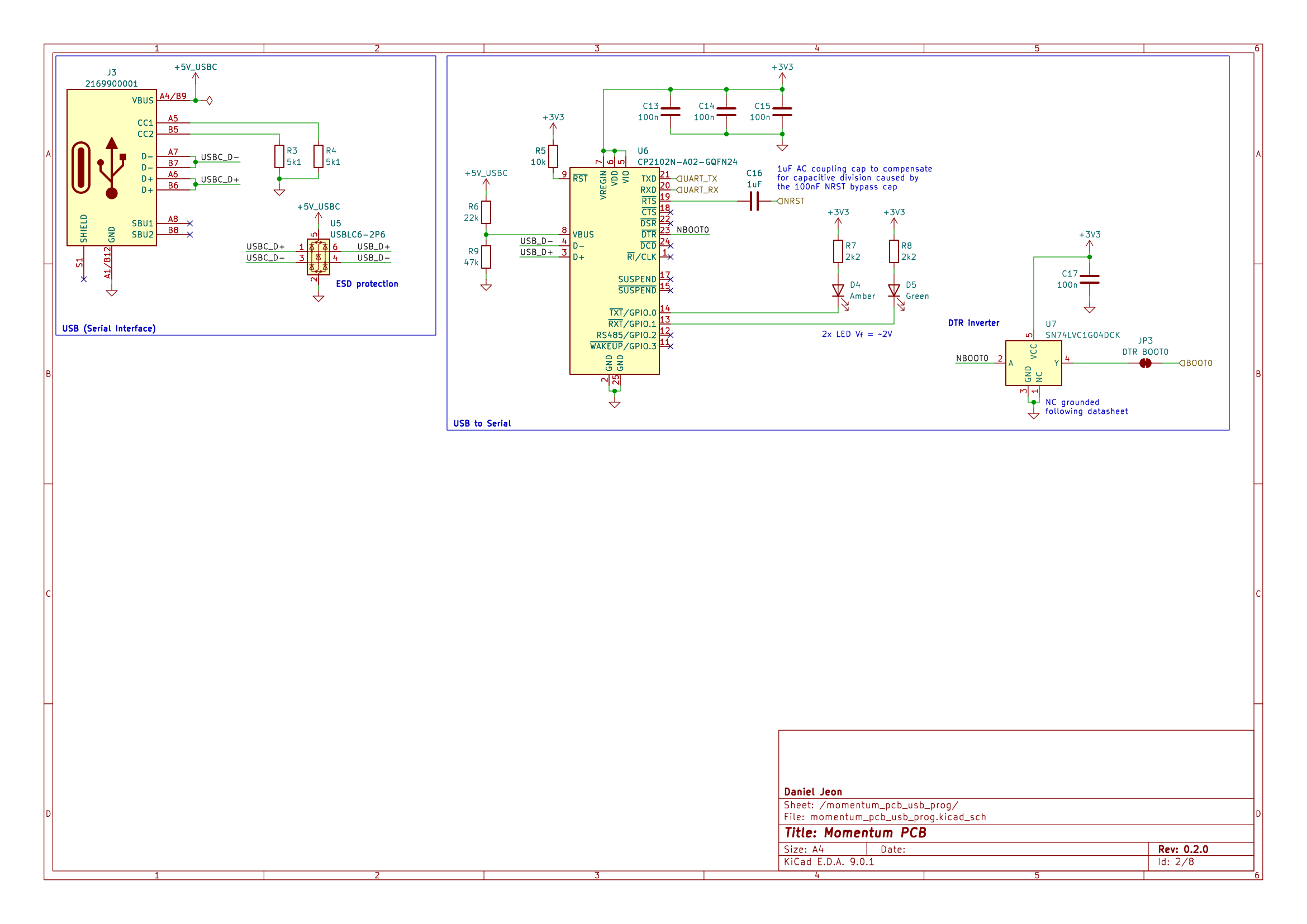
- Hands-free UART bootloader via USB-C (CP2102N USB-to-UART).
- SWD via Tag-Connect TC2050 interface.
- Manual BOOT0 jumper with UART bootloader via USB-C (CP2102N USB-to-UART).
Option 3 is applicable for users who wish to use the USB-C for as both a serial and UART bootloader interface. In this method, the through-hole BOOT0 jumper must be manually bridged to assert BOOT0.
See section 2.10 USB-C Serial Interface for details.
2.10 USB-C Serial Interface
The USB-C interface connected via the CP2102N USB-to-UART is primarily designed as a UART bootloader flashing interface, however can also be used as a serial interface for simple communication to a desktop computer.
Due to the design for hands-free flashing, the STM32’s BOOT0 will be controlled by the CP2102N’s DTR pin. Thus, when a COM port is established BOOT0 will be raised high, entering the bootloader. To prevent this behaviour, the BOOT0 DTR bridge jumper can be cut, allowing for USB-C serial communication.
If the user wishes to still use the UART bootloader with this modification, the BOOT0 must be asserted manually to enter the bootloader via the through-hole BOOT0 jumper.
3 Schematics
Download PDF: momentum_pcb-schematic.pdf.
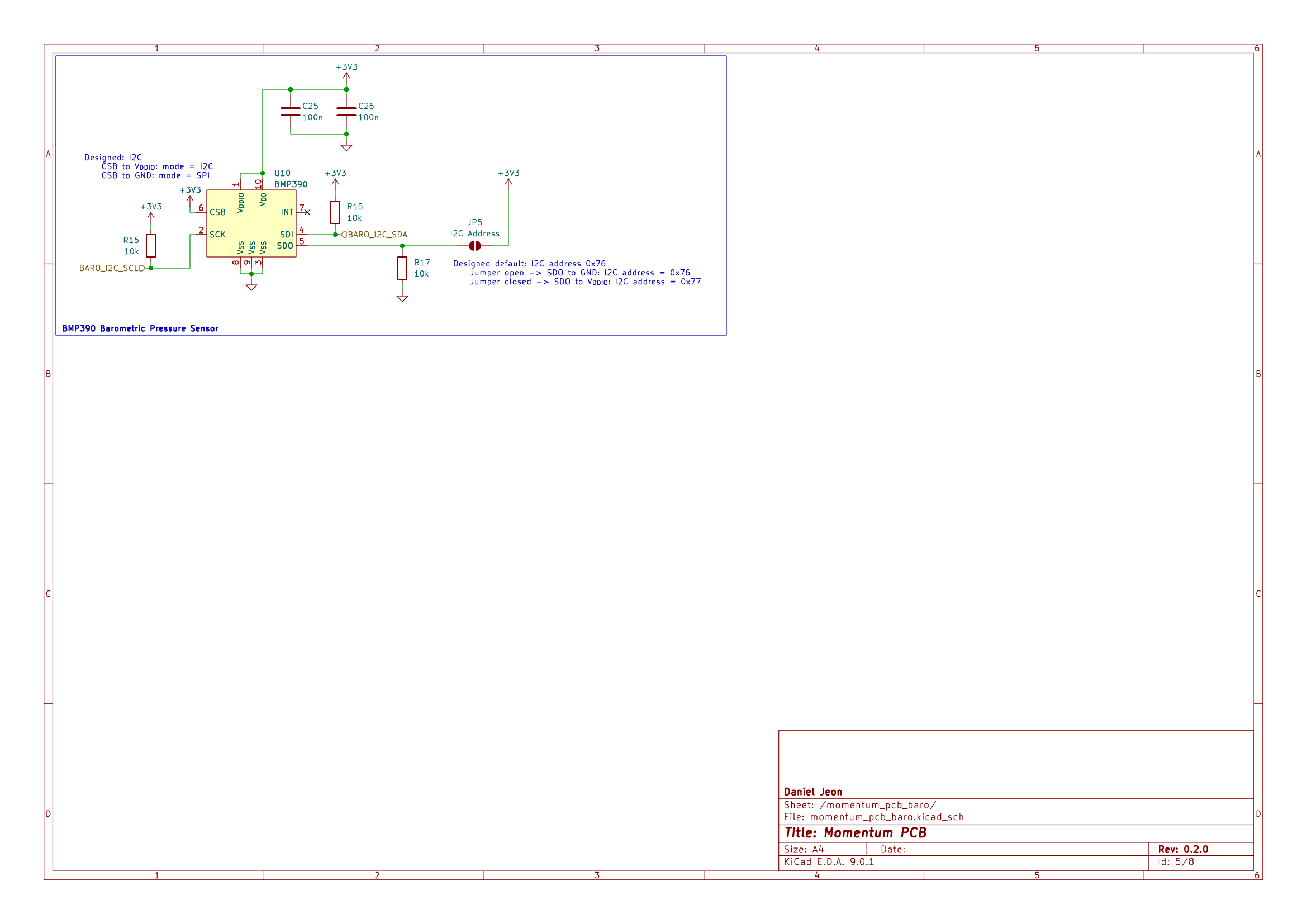
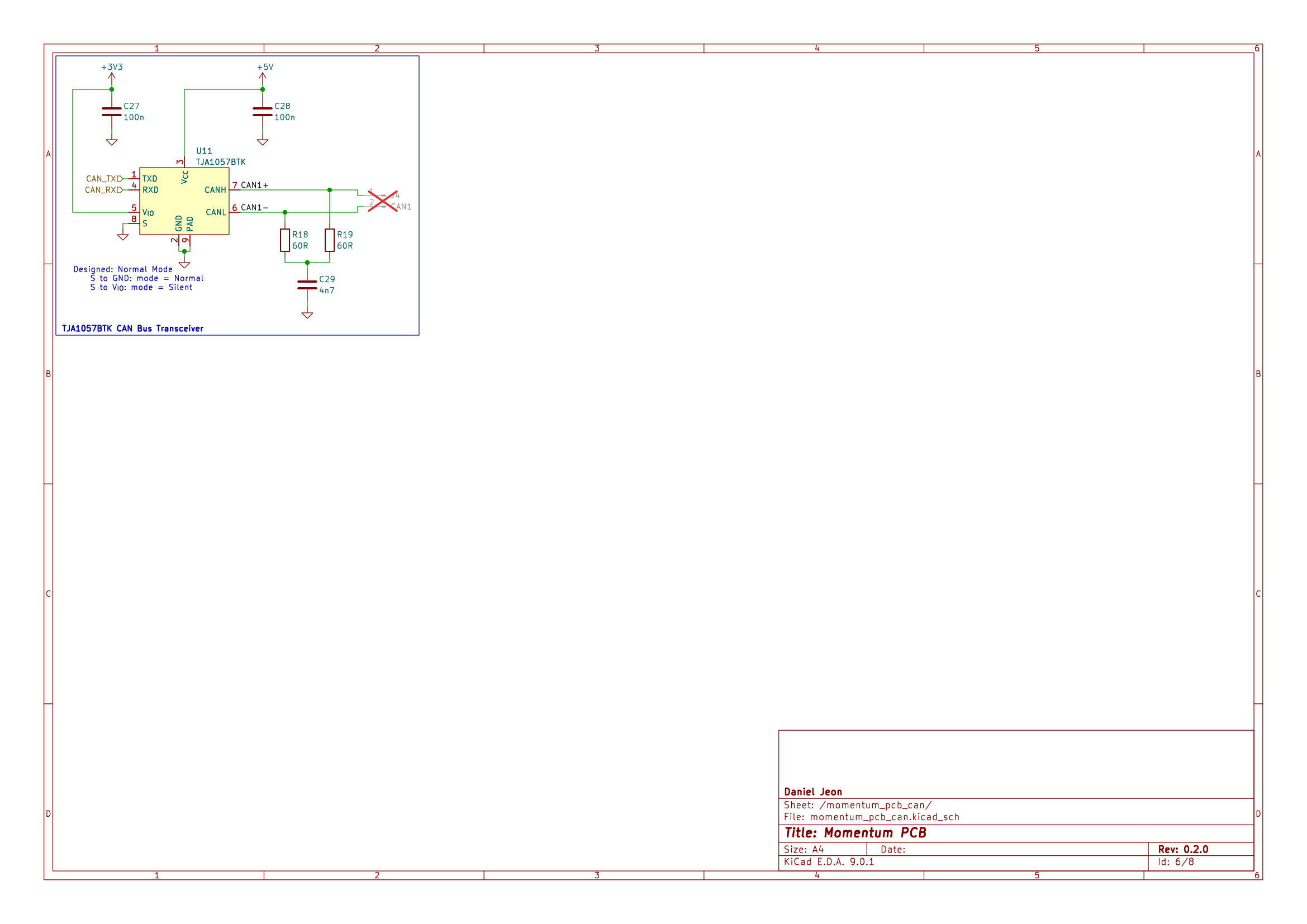
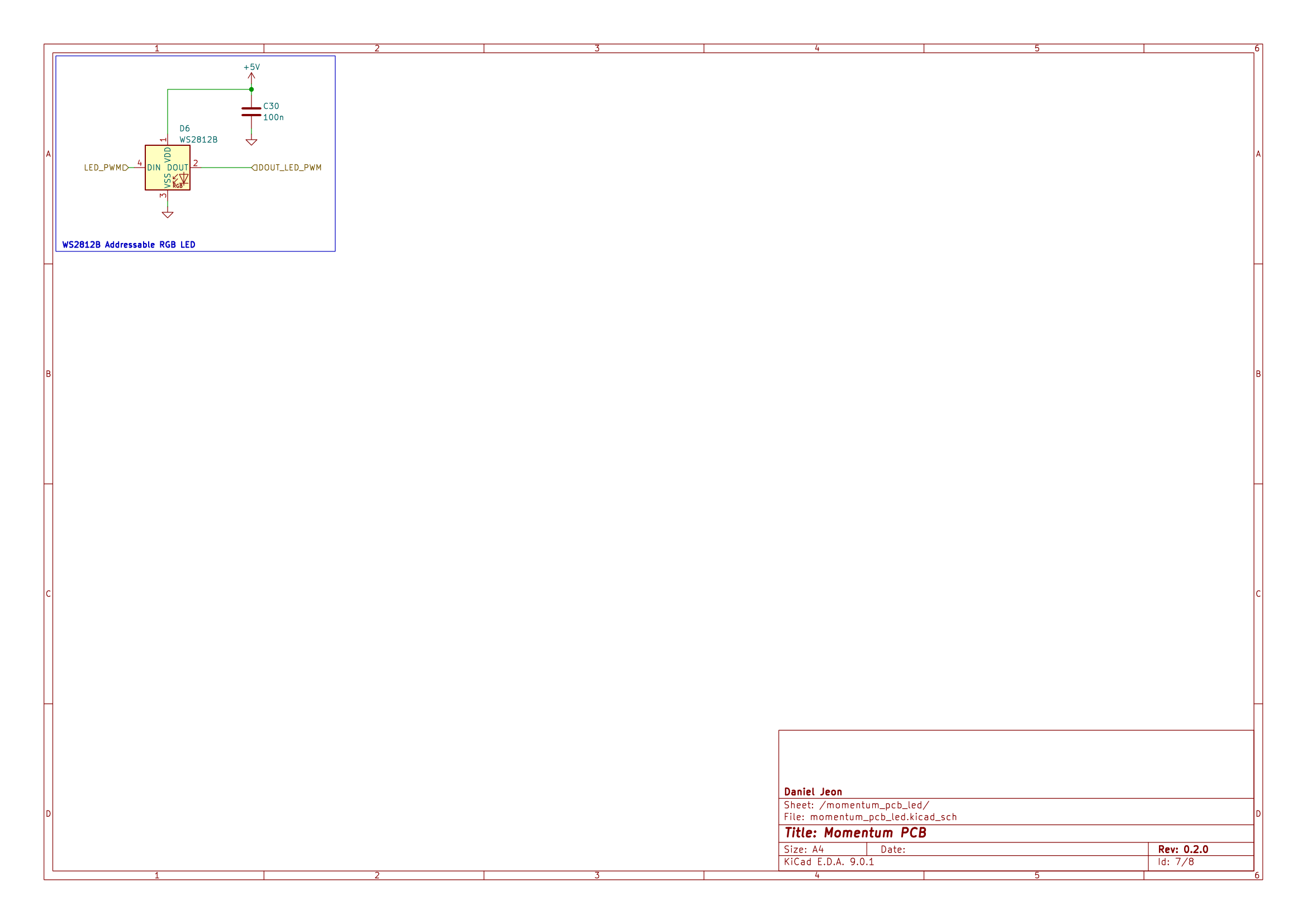
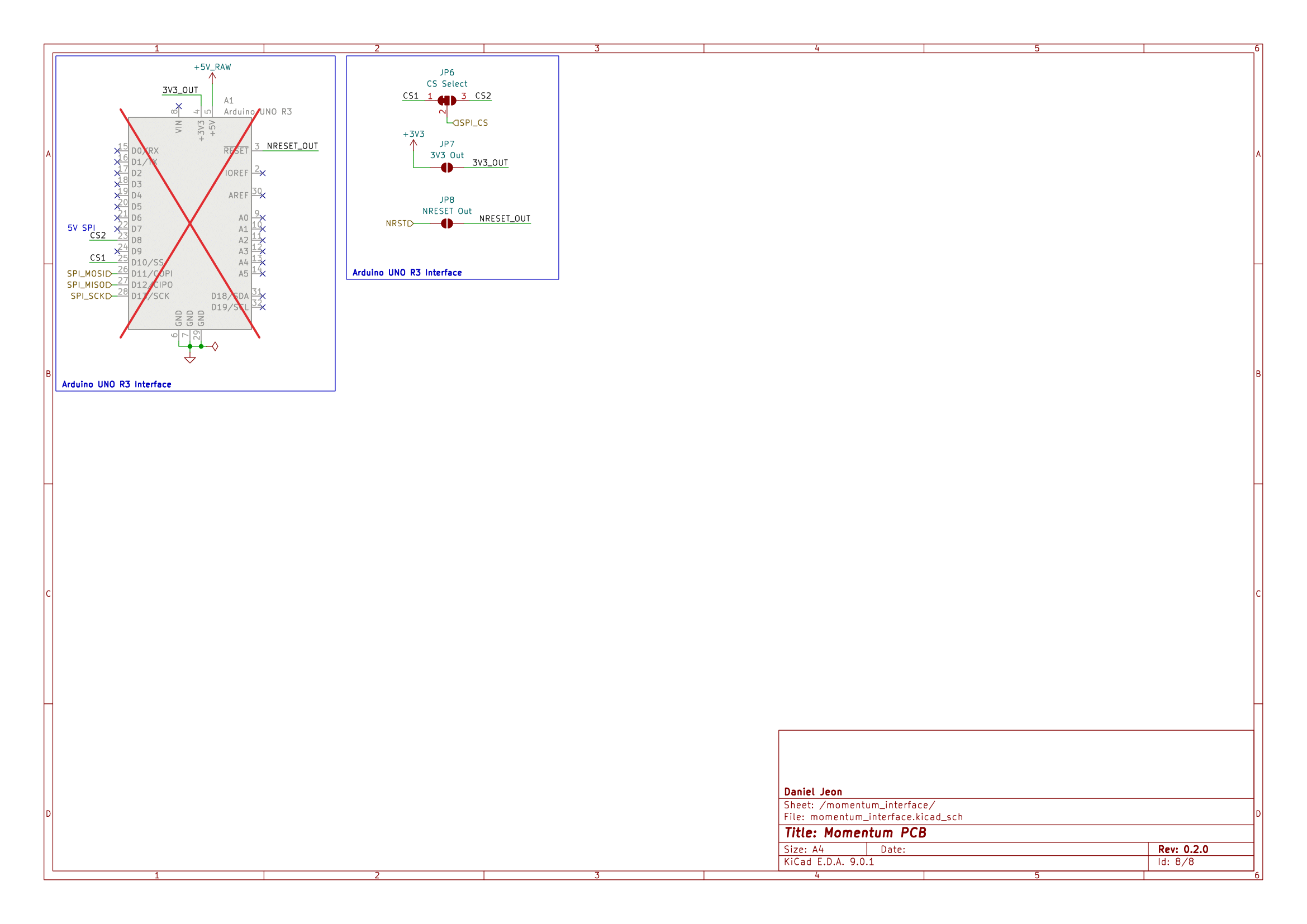
4 CAD 3D Model
Download STEP: momentum_pcb-3D.step.